Temple Run 2: Endless Escape
- 4.1
- Rating
- 1.00B
- Installs
- Free
- Price

 Analysis by App-foxy
Temple Run 2 is one of those action games I return to when I want something immediate rather than a long session with menus, tutorials, or complicated planning. I swipe to guide a runner through a dangerous route, react to obstacles, collect useful items, and try to stay alive a little longer than before. That simple loop still works remarkably well, especially when I have a few spare minutes.
What makes the game worth discussing today is not just its familiarity. It is how it handles quick play, repeated failure, changing routes, and the small bits of friction that can make a free mobile game either convenient or annoying. Imangi Studios has built a title that is easy to understand but difficult to master. I think it is a strong fit for players who enjoy reflex challenges, although it is not the best choice for anyone looking for a calm, story-heavy, or fully offline-style experience.
What the first few runs feel like
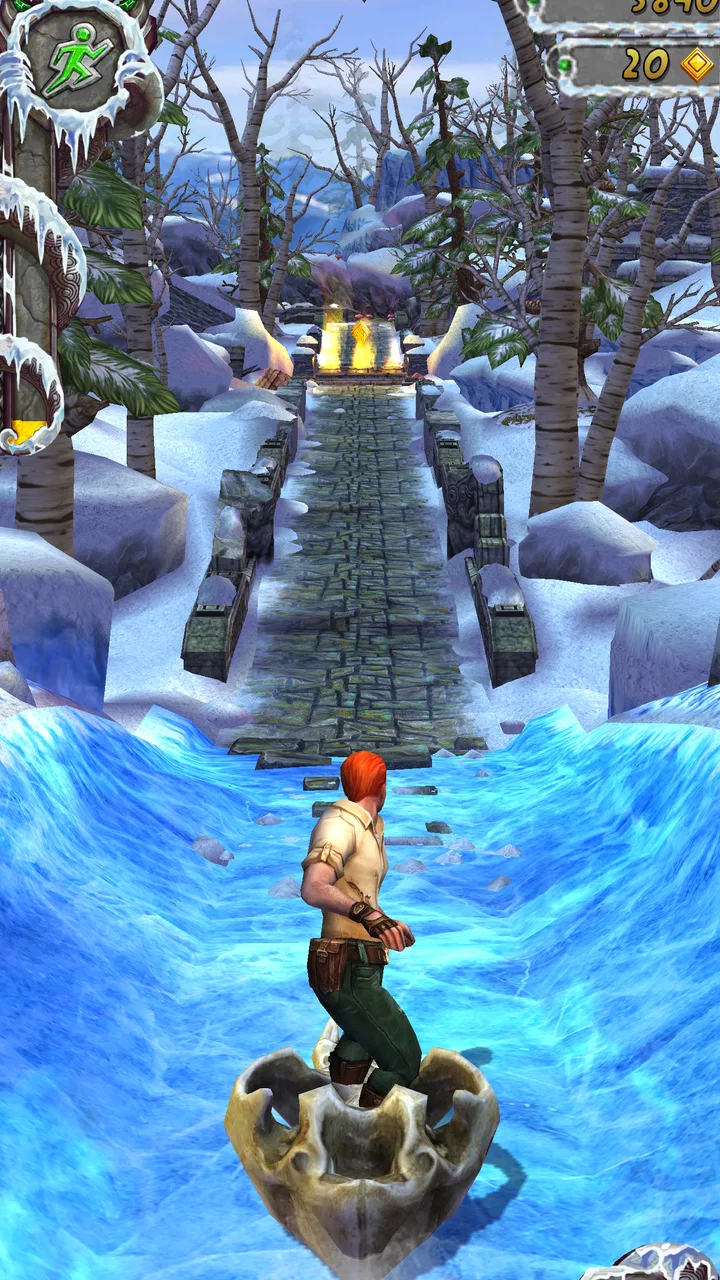
The opening experience is almost self-explanatory. The character runs automatically, so my attention goes to swiping left or right to change lanes, swiping up to jump, and swiping down to slide. Turning at the right moment is just as important as avoiding a barrier. The controls are simple enough for a new player to grasp quickly, but the speed and changing sequence of hazards create the real challenge.
In-Depth Coverage of Temple Run 2: Endless Escape
The first place many players get stuck is the assumption that every mistake is caused by slow reactions. In practice, I often failed because I made a swipe too early, held my finger on the screen too long, or focused on collecting something instead of reading the upcoming path. The game rewards looking slightly ahead rather than staring at the runner. Once I started treating the screen as a sequence of decisions instead of a single reflex test, my runs became more consistent.
That distinction matters because the game is built around repetition. A short run teaches me something about timing, lane changes, and how quickly a familiar-looking section can demand a different response. I do not need a long session to make progress as a player. A few focused attempts can be more useful than playing while distracted.
The action category is a natural fit, but this is a very specific kind of action game. It is not about direct combat, detailed exploration, or controlling a large team. The tension comes from movement and reaction. Compared with a traditional platform game, I have less freedom to stop and inspect the environment. Compared with a puzzle game, there is less time to think. That makes it entertaining during short breaks but tiring if I play for too long without a pause.
Where setup and early play can go wrong
Before blaming the game for a poor start, I check the basics. The current version is 1.130.0, and the listed minimum operating system is Android 6.0. On a compatible device, I still make sure the system has enough free storage for installation and updates, that the game has finished installing completely, and that the phone is not struggling with several demanding apps at once.
The game is free to install, which makes trying it easy, but free does not mean every part of the experience is frictionless. In-app purchases range from $0.99 to $49.99 per item. I personally treat purchases as optional rather than part of the basic control scheme. If I am handing the phone to a younger player, I check the device’s purchase protections first, because a fast action game can encourage impulsive taps after a failed run.
Its Everyone 10+ age guidance is also worth taking seriously. The presentation is accessible, but the game is built around danger, pursuit, and repeated near-misses. I would not use the age label as a substitute for judging whether a particular child enjoys that kind of pressure. The better approach is to watch a few minutes of play and decide whether the pace feels exciting or stressful.
Another useful setup check is touch behavior. If swipes are regularly ignored, I test the phone outside the game to see whether the screen responds normally near the edges. A thick case, damp fingers, a screen protector that is not sitting properly, or a crowded notification overlay can make an accurate swipe feel unreliable. I also avoid playing with the phone held in a way that lets my palm touch the display.
For a clean first session, I close unnecessary apps, use a stable connection when the game needs to load or update, and restart the game if the first launch behaves strangely. These are ordinary checks, but they solve more problems than immediately reinstalling. Reinstalling can also be a poor first step if I am worried about losing local progress or interrupting an account-based recovery process.
How I recover when a run or session goes badly
Recovery in this game is mostly about separating a gameplay mistake from a technical problem. If I hit an obstacle because I reacted late, there is nothing to repair; I simply start another run and adjust my timing. If the screen freezes, a swipe stops registering, or the game closes unexpectedly, I first remember exactly when it happened. Did it occur during a particular turn, after returning from another app, or only when the phone was hot? That detail helps me choose a sensible next step.
When controls feel inconsistent, I begin with a full restart of the game rather than repeatedly tapping the same command. I check that the phone is not in a low-power state that is making the whole interface sluggish, and I let the device cool if it has become noticeably warm. I also remove overlays such as floating controls or notification panels before trying another run. These steps are simple, but they reduce the chance of mistaking general device lag for a problem with the game’s swipe system.
You May Also Like

 Blood Strike: 2.5 Anniversary
Blood Strike’s Loadouts Turn Every Drop Into a Tactical Gamble
A close look at Blood Strike’s custom loadouts: how fast access to signature weapons reshapes its battle royale rhythm, rewards preparation, and narrows the gap between fights.

 Pandora - Music & Podcasts
Pandora’s Music Is Easy to Start, but Harder to Recover
Pandora’s strength is its low-effort path from a seed to a station. Its weak spot is how much confidence it asks you to place in connection, setup, and quiet recovery.

 8 Ball Pool
8 Ball Pool Is Built on Rivalries, Rematches, and Routine
A close look at the rivalries, rematches, shared routines, and unanswered safety questions that turn a quick pool match into a persistent mobile community.

 Samsung Music
Samsung Music’s Quiet Strength Is Playing What You Already Own
Its reach comes less from spectacle than from dependable access to a personal library. That simplicity is both the app’s strongest retention engine and its ceiling.

 AccuWeather: Weather Radar
AccuWeather Review: A Quick, Clear Forecast for Everyday Decisions
For everyday plans, the best forecast is the one you can understand quickly. AccuWeather makes rain timing, radar, and local conditions easy to act on, with a few trade-offs.

 Hill Climb Racing
Why Hill Climb Racing Still Turns Crashes Into One More Run
A tiny car, a bumpy hill and one more upgrade: Hill Climb Racing keeps resurfacing because its simple chaos makes every near-miss feel personal.
More From Our News Desk



If the game fails to open after an update, I check the operating system requirement, available storage, and whether the update completed successfully. A device can appear to have installed an update while still needing a restart before everything works properly. I prefer restarting first, then checking the app store’s update status, and only afterward considering a reinstall.
Reinstallation is the more disruptive option. Before using it, I make sure I understand how my progress is being stored and whether any purchase history can be restored through the platform account. I do not assume that deleting an app is a harmless troubleshooting shortcut. If progress matters, I take a moment to confirm the account or recovery route available on my device instead of wiping the installation immediately.
There is also a practical recovery technique for the gameplay itself. After several failed runs, I stop chasing the highest score and spend a few attempts focusing on one skill: clean lane changes, reliable jumps, or reading turns earlier. This reduces frustration and makes the next session more informative. In my experience, improvement comes faster when I isolate the mistake rather than treating every failure as a general lack of ability.
Small habits that make the endless format better
The most useful habit I developed is to protect my attention during the opening seconds of a run. It is tempting to look at the score, objectives, or collected items, but the route deserves priority. I keep my eyes near the middle distance of the path, where the next decision is becoming visible. This is especially helpful when the game presents a tempting collectible beside a hazard.
I also avoid playing one-handed while walking or doing another task. The controls may look casual, but accurate swipes require a stable grip and a clear view. On a bus or train, I can play comfortably if I accept that movement around me may cause mistakes. For serious attempts, I prefer sitting down with both hands available, even though only one finger may be doing most of the input.
A second non-obvious trade-off is session length. The game is excellent at making “one more run” feel reasonable, but repeated high-speed reactions can become mentally dull. When I notice that I am making the same mistake three times in a row, I take a break. Continuing at that point usually produces frustration rather than useful practice.
A third useful approach is to treat optional purchases as convenience choices, not solutions to weak play. Spending money may change how quickly I move through parts of the experience, but it cannot replace learning the route patterns and swipe timing. I would only consider a purchase after deciding that I genuinely enjoy the core loop, not because a difficult run made me feel pressured.
The game’s large audience supports its role as a familiar pick-up-and-play title. It has an average rating of 4.1 from around 10 million ratings, and it has passed 1 billion installs. Those figures suggest broad appeal, but they do not guarantee that I will enjoy its repetition. Popularity tells me that the basic formula connects with many players; it does not remove the need to decide whether endless runs suit my habits.
When the problem is probably outside the game
Not every failed launch, delay, or interruption originates in the app. If other games and video apps are also slow, the phone may be low on storage, overloaded, or affected by a system issue. If only online functions are unreliable, I test another connection before changing the installation. A weak or unstable network can make loading feel like an app failure even when the game itself is running normally.
Battery behavior can also be misleading. A demanding action game may make an older phone warm or drain power faster than a reading app. I do not play while the device is already overheating, especially under direct sunlight. Lowering general device strain, removing it from a hot environment, and trying again later are safer first steps than repeatedly forcing the game to open.
Touch problems deserve the same outside check. I test swipes in another app and clean the screen with a suitable soft cloth. If the entire phone misses gestures, the issue is probably not specific to this title. If only one edge of the display fails, the case or screen protector becomes a more likely suspect. This simple comparison prevents a lot of unnecessary troubleshooting.
Notifications and interruptions are another source of unfair-looking mistakes. A message banner can cover part of the route or break concentration at the exact moment a turn appears. For a focused session, I use the phone’s normal notification controls and avoid switching rapidly between apps. I do not need a complicated configuration; I just need the display to remain clear while the run is active.
Finally, I distinguish between a one-time crash and a repeatable pattern. A single bad launch after a system update is frustrating but not enough to conclude that the game is broken. Repeated crashes after the same action deserve more attention, including checking for a newer game or system update and using the platform’s standard support route. Keeping the description precise is more useful than saying only that it “doesn’t work.”
Who should choose it over other action games
I recommend this game to someone who wants a quick reflex challenge with almost no learning curve. It works well for filling a short wait, taking a break from slower games, or practicing reaction and timing without committing to a campaign. The automatic running keeps the focus narrow, which is exactly why it feels so accessible.
It is also a good choice for players who enjoy personal improvement. The game does not need a complicated story to provide a reason to try again. I can compare my own decisions from one run to the next and notice whether I am reading turns earlier or wasting fewer movements. That self-contained challenge is satisfying when I want something competitive without needing a large multiplayer commitment.
However, I would steer some players elsewhere. If you want deliberate exploration, open-ended movement, or a strong narrative, the fixed forward motion will feel restrictive. If you dislike repeated failure, pursuit pressure, or optional spending prompts, a premium puzzle game may be a better match. If you need a game for very young children, the Everyone 10+ guidance means I would choose more carefully rather than assuming its cartoon-like presentation makes it suitable for everyone.
Compared with slower action alternatives, this title has less downtime and a clearer immediate goal. Compared with platform games, it gives me fewer opportunities to stop and plan. Compared with endless games that rely mainly on passive upgrades, it places more emphasis on my moment-to-moment input. That combination is its main strength and also its main limitation: the experience stays lively, but it can become repetitive if I am not in the mood for reaction-based play.
My practical verdict after using it
Temple Run 2 remains an easy recommendation for the right kind of mobile player. I like that I can understand the controls immediately, start a meaningful attempt in seconds, and improve through observation rather than a long tutorial. Imangi Studios keeps the central idea focused: move well, read the path, and survive longer.
My advice is to install it with realistic expectations. It is free, but optional purchases sit between $0.99 and $49.99 per item, so I would set purchase safeguards before letting someone else play. I would also check device compatibility, storage, touch response, and connection quality before treating a launch problem as a game defect.
The game is not ideal when I want rest, story, or deep control. It asks for concentration, repeats its core structure, and can make short sessions stretch longer than planned. Still, for a quick action game that rewards clean reactions and gradual improvement, it continues to do its job very well. If you enjoy chasing a better run rather than reaching a final ending, this is one of the safer free choices to try.
FAQs for Temple Run 2: Endless Escape
01What is the main objective of Temple Run 2: Endless Escape?
Temple Run 2: Endless Escape is an endless runner game where the primary objective is to navigate through various obstacles while collecting coins and power-ups. Players must swipe to turn, jump, and slide to avoid hazards, all while being chased by a giant monkey. The goal is to survive as long as possible and achieve high scores.
02Are there any in-app purchases in Temple Run 2: Endless Escape?
Yes, Temple Run 2 offers in-app purchases. Players can buy coins, gems, and power-ups to enhance gameplay. While these purchases can improve the gaming experience by unlocking characters and abilities faster, they are entirely optional, and the game can be enjoyed fully without spending money.
03What are the system requirements for Temple Run 2: Endless Escape?
Temple Run 2 is available for both Android and iOS devices. For Android, it typically requires Android 4.1 and up, while iOS devices usually need iOS 9.0 or later. It’s advisable to have a device with sufficient storage space and a stable internet connection for the best gaming experience.
04Can Temple Run 2: Endless Escape be played offline?
Yes, Temple Run 2 can be played offline, which makes it a great option for gaming on the go. However, some features like leaderboards and in-app purchases require an internet connection. Playing offline won't affect the core gameplay, allowing you to enjoy endless running anytime.
05How can players save their progress in Temple Run 2: Endless Escape?
Players can save their progress by connecting the game to their social media accounts or using cloud storage features available within the app. This ensures that achievements, high scores, and unlocked content are synchronized across different devices and can be restored if the app is reinstalled.
Pros
- Engaging graphics and environments.
- Smooth and responsive controls.
- Varied power-ups enhance gameplay.
- Regular updates with new content.
- Free to play with optional purchases.
Cons
- Levels can feel repetitive over time.
- In-app purchases can be pricey.
- Ads can interrupt gameplay.
- Requires internet for some features.
- Battery drains quickly during play.

Temple Run 2: Endless Escape
Gallery